
Choosing between everyday tablet portability and pro-grade computing performance often leads buyers into a price dilemma. Mid-range tablets frequently compromise on display fidelity, accessory support, or processing power to keep costs manageable.
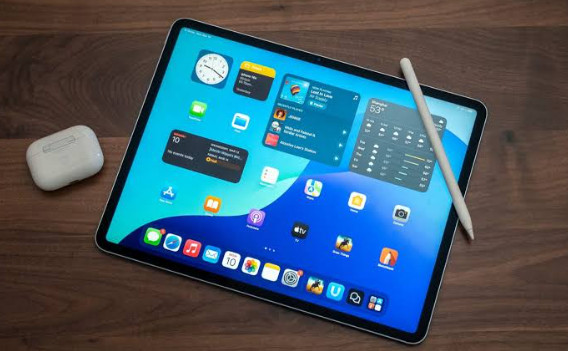
Apple bridges this gap with the iPad Air M3 (2026), available in both 11-inch and 13-inch display configurations. Powered by the M3 Apple Silicon chip, this lineup delivers laptop-grade performance, active Apple Pencil Pro integration, and a redesigned landscape front camera for video calls.
At Numerello, we evaluated both sizes of the iPad Air M3 across heavy digital art rendering, split-screen multitasking, media playback, and extended battery endurance testing. Here is our full technical breakdown.
1. Dual-Size Form Factors and Liquid Retina Display Engineering
Offering two distinct sizes allows the iPad Air lineup to target two different user profiles: the 11-inch model focuses on ultraportable handheld comfort, while the 13-inch model provides 30% more screen space for split-screen productivity and digital illustration.
Both configurations feature Apple’s Liquid Retina LED-backlit displays with True Tone, P3 wide color gamut coverage, and an anti-reflective coating that maintains visibility under ambient office lighting.
The front-facing 12MP Ultra-Wide camera sits along the long landscape edge, making natural eye contact easier during video meetings. If you want to compare this display performance against Apple’s top-tier OLED tablet, read our iPad Pro M4 (13-inch) review.
2. M3 Silicon Processing and Heavy Workload Benchmarks
The integration of the M3 chip brings a high-performance 8-core CPU and 10-core GPU to the mid-tier iPad line. Hardware-accelerated ray tracing and mesh shading allow the Air to run graphic-intensive games and 3D modeling applications smoothly.
During our multi-layer Procreate sketching tests and 4K ProRes video rendering trials, the M3 chip processed heavy timeline exports without thermal throttling or frame drops.
The 16-core Neural Engine accelerates machine learning tasks, such as automated subject separation in Pixelmator and background noise removal during audio recording.
If you prefer a budget-friendly Android tablet alternative for streaming and light multitasking, take a look at our Xiaomi Pad 6 review.
3. Accessory Ecosystem, Apple Pencil Pro, and Magic Keyboard
The iPad Air M3 fully supports the Apple Pencil Pro, featuring barrel roll haptics, squeeze gesture menus, and precise hover preview capabilities.
For document creation and laptop replacement setups, the tablet pairs with the Magic Keyboard featuring a floating cantilever design, backlit keys, and an integrated trackpad.
Key productivity features include:
-
Landscape Stereo Speakers: Spatial Audio support for immersive video playback
-
USB-C Port: Up to 10Gbps data transfer speeds for external SSD drives and displays
-
Touch ID Security: Integrated directly into the top power button for fast authentication
If you require a lightweight, full-fledged Windows 11 2-in-1 machine with a built-in kickstand for desktop apps, explore our Microsoft Surface Pro 11 review.
4. Real-World Battery Life Testing and Charging Dynamics
Sustaining continuous M3 performance within an ultra-thin 6.1mm aluminum enclosure requires precise energy efficiency. Apple equips both models with high-density lithium-polymer cells tailored to their display dimensions.
During our standardized web browsing and Wi-Fi streaming tests at 150 nits brightness, both the 11-inch and 13-inch models achieved 10.5 hours of active battery life.
The tablet charges via its USB-C port, reaching a 50% charge in roughly 40 minutes when connected to a 30W or higher Power Delivery adapter.
If you are looking for a compact Android productivity tablet with an included stylus in the box, check out our Google Pixel Tablet review.
5. Technical Specifications Overview
| Hardware Category | Specification Details |
| Display Panel | 11-inch / 13-inch Liquid Retina Display (P3 Color, True Tone) |
| System Processor | Apple M3 Chip (8-Core CPU, 10-Core GPU, 16-Core Neural Engine) |
| Storage Options | 128GB, 256GB, 512GB, 1TB NVMe Storage |
| Camera Setup | 12MP Wide Rear Camera / 12MP Landscape Ultra Wide Front |
| Battery Life | Up to 10.5 Hours Active Wi-Fi Web Browsing |
6. The Verdict: Is the iPad Air M3 Worth Buying?
The iPad Air M3 (11 & 13-inch) offers the ideal middle ground in Apple’s tablet lineup. It delivers roughly 80% of the M4 Pro’s real-world performance at a significantly lower price point, making it an excellent investment for students, creators, and professionals.
You should buy the iPad Air M3 if you want M-series power, Apple Pencil Pro support, and a choice between compact mobility or a large 13-inch canvas without paying Pro-level prices.
However, if you demand ultra-deep blacks, a 120Hz ProMotion display, and an ultra-thin tandem OLED panel, read our iPad Pro M4 (13-inch) review before making your choice.