Lenovo ThinkPad X1 Carbon Gen 13 Review: The Business Flagship Reimagined

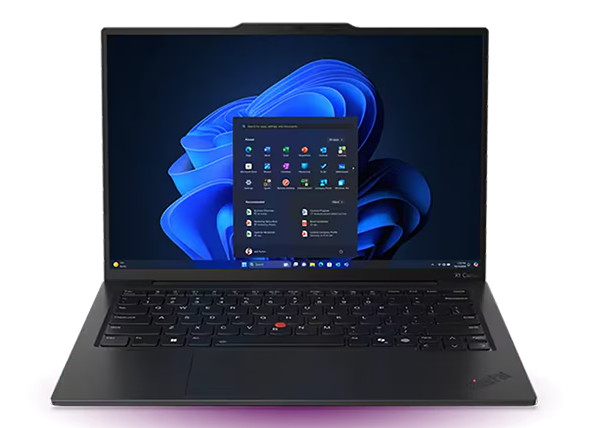
Business laptops must balance structural resilience, exceptional keyboard ergonomics, and dependable full-day battery life. Portable enterprise hardware cannot afford thermal throttling or compromised security features during critical workflows.
Lenovo refines this balance with the ThinkPad X1 Carbon Gen 13. By pairing a lightweight carbon-fiber chassis with Intel Core Ultra processing and a vivid OLED display option, Lenovo sets a high standard for executive mobility.
At Numerello, we placed the ThinkPad X1 Carbon Gen 13 through rigorous daily productivity tests, typing endurance trials, and battery benchmarks. Here is our full evaluation.
1. Ultralight Carbon-Fiber Build and Ergonomic Keyboard
The physical presentation of the X1 Carbon Gen 13 stays true to its iconic heritage while introducing key structural improvements. The lid utilizes woven carbon fiber, while the bottom enclosure relies on recycled magnesium alloy, keeping total weight under 1.1 kilograms.
Opening the chassis reveals the legendary ThinkPad keyboard layout. Key travel remains deep and springy, offering a tactile typing experience that reduces finger fatigue during long document creation sessions.
The TrackPoint pointing stick remains centered above the glass touchpad, flanked by tactile physical buttons.
On the front, the 14-inch 2.8K OLED display panel delivers deep contrast ratios, dynamic color accuracy, and an anti-glare coating that excels in bright office environments. If you want to evaluate another premium ultraportable with a futuristic edge, read our Dell XPS 13 Plus (2026) review.
2. Intel Core Ultra Performance and Enterprise Thermal Management
Under the hood, the Gen 13 configuration runs on the latest Intel Core Ultra processor architecture with integrated Intel Arc graphics and up to 64GB of fast LPDDR5X RAM.
Large spreadsheet calculations, multi-stream video conferencing, and background data compiling run seamlessly without system lag. The integrated Neural Processing Unit (NPU) handles local AI workloads, such as real-time eye contact correction and background noise cancellation, preserving core CPU power.
Dual-fan thermal management draws air efficiently through redesigned base vents. Fan noise remains whisper-quiet under standard office workloads, keeping keyboard surface temperatures comfortable.
If your enterprise workflow favors macOS silicon efficiency instead of Windows enterprise software, take a look at our Apple MacBook Air M4 review.
3. Security Architecture and Comprehensive Port Selection
Enterprise deployments demand robust hardware-level security. The X1 Carbon Gen 13 integrates a discrete TPM 2.0 chip, a match-on-chip fingerprint reader, and an infrared webcam with a physical shutter.
Presence detection sensors automatically lock the device when you step away and initiate instant facial login upon your return.
Unlike many modern ultrabooks that remove traditional connectivity, Lenovo maintains a practical port selection. The chassis features two Thunderbolt 4 USB-C ports, two USB-A ports, a full-sized HDMI 2.1 output, and a 3.5mm headphone jack.
This eliminates the need for external dongles during presentations or office travel. For executives who need a versatile 2-in-1 touchscreen device with stylus support alongside their laptop, explore our Microsoft Surface Pro 11 review.
4. Real-World Battery Endurance and Charging Speed
Sustaining a high-resolution display and high-performance processor requires smart power routing. Lenovo equips the Gen 13 with a 57Wh battery tuned for dynamic power consumption.
During our standardized web browsing and document editing tests over Wi-Fi, the X1 Carbon Gen 13 delivered just over 11 hours of active use on a single charge.
The included 65W USB-C charger supports Rapid Charge technology, restoring up to 80% battery capacity in roughly 60 minutes.
Users who want a tablet alternative for lightweight media consumption and mobile notes during business travel can also read our iPad Pro M4 (13-inch) review.
5. Technical Specifications Overview
| Hardware Category | Specification Details |
| Display Panel | 14-inch 2.8K OLED (120Hz, Anti-Glare, 400 Nits) |
| System Processor | Intel Core Ultra 7 (Series 2 / 2026 Architecture) |
| System Memory | 16GB / 32GB / 64GB LPDDR5X RAM |
| Storage Capacity | Up to 2TB PCIe 4.0 NVMe SSD |
| Battery & Charging | 57Wh Battery with 65W USB-C Rapid Charge |
6. The Verdict: Is the ThinkPad X1 Carbon Gen 13 Worth Buying?
The Lenovo ThinkPad X1 Carbon Gen 13 remains the ultimate business ultrabook. It combines an ultralight carbon-fiber body with unmatched keyboard ergonomics, strong security features, and reliable battery life.
You should buy the X1 Carbon Gen 13 if you are a professional or corporate executive who requires an uncompromising mobile workstation with full port connectivity.
However, if you prioritize ultra-thin futuristic glass aesthetics over traditional enterprise durability, make sure to read our Dell XPS 13 Plus (2026) review before making your final choice.