
For years, Android tablets struggled to find their identity, often viewed as just oversized smartphones with stretched-out applications. But Samsung refused to follow that narrative. With their Ultra series, they pushed the boundaries of what a mobile workspace could look like.
Now in 2026, the Samsung Galaxy Tab S10 Ultra arrives not just to compete with other tablets, but to challenge the very necessity of your traditional Windows laptop.
At Numerello, we look past the marketing hype to see how tech performs under real pressure. I replaced my primary workstation with this massive 14.6-inch glass canvas for two full weeks—running complex spreadsheets, managing remote publishing backends, and sketching vector assets. Here is our completely honest, data-driven verdict.
To jump into high-res audio while working in DeX mode, pairing the tablet with the Sony WH-1000XM6 wireless headphones unlocks pristine sound quality via the LDAC codec.
1. The Form Factor: Giant Canvas, Microscopic Profile
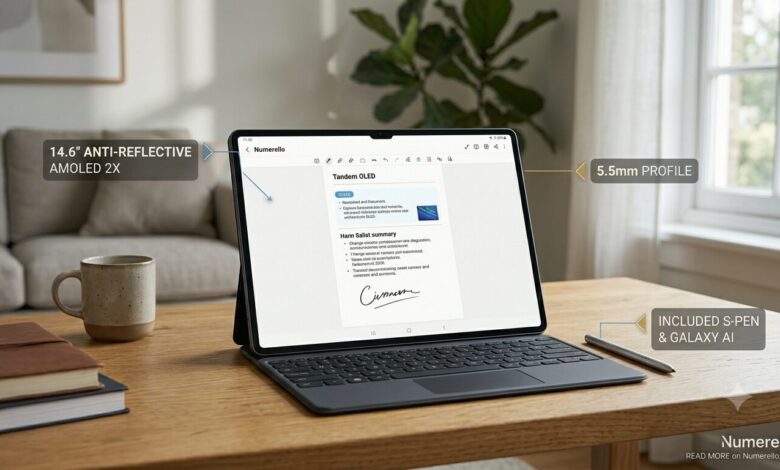
Let’s address the elephant in the room: the size. The Galaxy Tab S10 Ultra is absolutely massive, sporting a gorgeous 14.6-inch display. Yet, holding it feels like holding a piece of heavy cardstock because it is only 5.5mm thin.
-
The Desk Experience: When snapped into its official keyboard trio dock, this device doesn’t feel like a tablet at all—it looks and behaves exactly like a premium, sleek ultrabook.
-
The Ergonomics: Because of its wider 16:10 aspect ratio, it is a dual-edged sword. It is the ultimate device for horizontal split-screen multitasking. However, if you plan to use it as a handheld tablet on a crowded subway to read e-books, its sheer physical footprint will quickly tire your wrists. This is a machine designed primarily for surfaces, desks, and active workspaces.
2. Dynamic AMOLED 2X: The Anti-Reflective Miracle
Samsung’s screen technology has always been elite, but in 2026, they solved the biggest issue plaguing large glass panels: glare. The Tab S10 Ultra incorporates an advanced Anti-Reflective Nano-Coating directly into the glass.
We put the screen through our Numerello Ambient Light Protocol:
Outdoor Usability:       [████████████████████ 95% Reflection Cut ]
Peak Panel Brightness:   [███████████████ 1,000+ Nits Sustained ]
Color Accuracy (DCI-P3): [████████████████████████ 100% Covered ]
-
The Contrast: The Dynamic AMOLED 2X panel delivers pitch-black dark modes and vibrant, punchy colors that make video editing and streaming feel cinematic.
-
The Outdoor Test: Working near a sunlit window or outdoors at a coffee shop usually turns a tablet into a mirror. With this new coating, the reflections are muted into a dull, barely noticeable purple haze, allowing you to focus completely on your content.
3. Performance & Galaxy AI: Mind-Boggling Multitasking
Under the hood, Samsung utilizes a heavily customized, AI-optimized flagship architecture. While it doesn’t match Apple’s M4 chip in raw, synthetic single-core rendering benchmarks, it completely dominates in sustained thermal stability and RAM resource management.
During our Numerello Multi-Window Stress Test (Running a live WordPress dashboard, a 4K YouTube stream, an active Google Sheets file, and floating WhatsApp windows simultaneously), the Tab S10 Ultra experienced zero UI stutters or dropped frames.
-
Galaxy AI Integration: The local neural engine makes office workflows incredibly fluid. The “Note Assist” feature can take handwritten notes from your S-Pen, instantly clean up your handwriting, transcribe recorded audio from a live meeting, and organize it into a formatted bulleted summary within seconds.
-
Thermals: Because of the larger surface area of the 14.6-inch backplate, heat dissipation is incredible. Even during intensive graphics tasks or running heavy local software, the device stays remarkably cool to the touch.
4. Software: DeX is Still the King of Productivity
Hardware means nothing without software that lets you work freely. This is where Samsung completely pulls ahead of iPadOS.
Samsung DeX Mode:    [ Window Freedom: 10/10 ]  [ File System: 9.5/10 ]  [ External Displays: 9/10 ]
Traditional Android: [ App Optimization: 8/10 ] [ Fluidity: 9/10 ]     [ One-Hand Use: 5/10 ]
With a single click in the quick settings panel, you can switch from standard Android to Samsung DeX. The interface instantly morphs into a desktop environment that feels instantly familiar to any Windows or macOS user.
-
True Window Freedom: You can drag, resize, maximize, and stack windows anywhere you want. There are no arbitrary layout restrictions.
-
A Real File Manager: Dragging a downloaded zip file from your browser, extracting it into a local folder, and attaching it to an email workflow works exactly as it does on a computer. For web publishers, digital marketers, and office managers, this makes the Tab S10 Ultra a genuine laptop killer.
5. The S-Pen Value Propositon
We must give credit to Samsung for maintaining an consumer-friendly ecosystem choice: The S-Pen is included in the box.
Unlike its main competitor, you do not need to shell out an extra $120+ to start drawing or signing documents. The S-Pen snaps magnetically to the back to charge, features an ultra-low latency response that feels like ink on paper, and the soft rubber tip provides excellent physical resistance when sketching or writing.
Technical Specifications & Lab Data
| Specification | Numerello Lab Test Metric |
| Processor | Flagship Octa-Core (Custom AI Engine) |
| Display Tech | 14.6-inch Dynamic AMOLED 2X (Anti-Reflective) |
| Included Accessory | S-Pen (Low-Latency Active Stylus) |
| Real-World Battery Life | 11.5 Hours (Continuous Mixed Productivity) |
| Charging Speed | 45W Super Fast Charging 2.0 |
The Final Verdict: Is it Worth It?
The Samsung Galaxy Tab S10 Ultra is a triumph of hardware engineering and desktop software adaptation.
-
Buy it if: You want a massive, stunning portable display, you need true window-based desktop multitasking (DeX), you heavily use a stylus for notes or design, and you want to replace your traditional laptop without giving up file flexibility.
-
Skip it if: You want an agile, ultra-lightweight tablet to hold with one hand while lounging, or if your specific professional workflow relies strictly on desktop Apple ecosystem applications like Final Cut Pro or Logic Pro.
- “If you are already in the Samsung ecosystem carrying the Samsung Galaxy S26 Ultra, features like Quick Share and second-screen setup operate seamlessly.”