Dell XPS 13 Plus (2026) Review: Minimalist Aesthetics Meets Next-Gen Performance

Ultraportable laptops have evolved beyond simply being light and easy to carry. Modern creative professionals and mobile executives now expect sleek aesthetics, high-end display fidelity, and all-day battery efficiency in a single compact chassis.
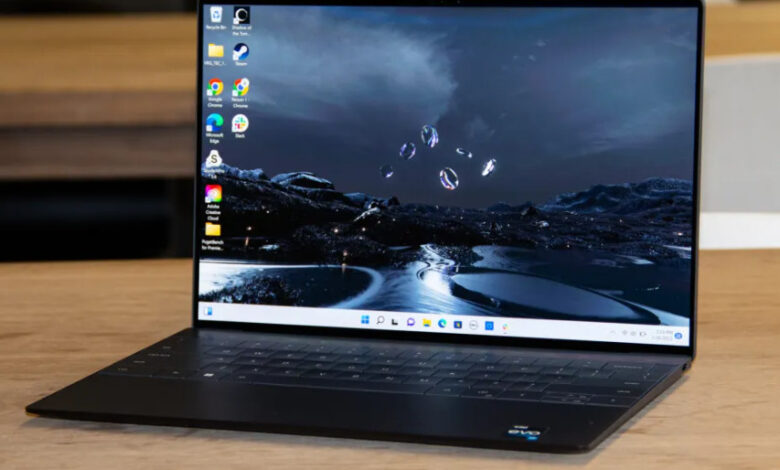
Dell directly addresses these demands with the Dell XPS 13 Plus (2026). Featuring a seamless glass palm rest, an invisible haptic touchpad, and a zero-lattice keyboard, this flagship ultraportable continues to push the boundaries of industrial design.
At Numerello, we subjected the XPS 13 Plus (2026) to real-world performance benchmarks, extended typing sessions, and continuous video playback. Here is our detailed evaluation of Dell’s futuristic machine.
1. Futuristic CNC Aluminum Chassis and Borderless Display
The physical design of the XPS 13 Plus remains one of its defining traits. Sculpted from high-precision CNC machined aluminum, the chassis feels exceptionally rigid with zero flex around the keyboard deck.
Opening the lid reveals a striking capacitive touch function row along the top. Additionally, the glass touchpad blends seamlessly into the palm rest, using precise haptic motors to simulate physical clicks.
On the front, the 13.4-inch OLED touch display features ultra-thin InfinityEdge borders on all four sides. The 3.2K resolution delivers deep contrast ratios and exceptional color accuracy for photo editing.
Peak brightness reaches 500 nits, making outdoor productivity easily manageable. Furthermore, the 120Hz dynamic refresh rate ensures smooth UI animations throughout daily tasks. If you want to compare this layout against another lightweight contender, take a look at our Apple MacBook Air M4 review.
2. Next-Gen Processing Efficiency and Thermal Management
Under the hood, the 2026 XPS 13 Plus is powered by Intel’s latest Core Ultra processor architecture, paired with integrated Intel Arc graphics and 32GB of LPDDR5X memory.
System responsiveness is immediate when launching resource-intensive apps or managing dozens of browser tabs simultaneously. The dedicated NPU accelerates background AI workloads, such as live video noise removal and dynamic image generation, without taxing the main CPU cores.
Thermal dynamics are managed by dual opposing fans that draw air through subtle vents along the side edges. During intense multi-core rendering tasks, fan noise remains unobtrusive.
Consequently, skin temperatures on the palm rest stay comfortable during extended typing sessions. If your mobile workflow requires an even larger tablet-based digital canvas, read our Samsung Galaxy Tab S10 Ultra review.
3. Keyboard Ergonomics and Media Consumption Capabilities
The zero-lattice keyboard layout spans the entire width of the interior deck. Keycaps are large, flat, and offer 1.0mm of key travel with a tactile, springy actuation point.
Typing long editorial pieces is surprisingly comfortable once you adjust to the tight spacing between keys. Backlighting automatically adjusts based on ambient light levels in your workspace.
Audio performance is surprisingly robust for an ultrabook of this size. Quad-speaker output delivers clean highs and clear mid-range vocal separation during conference calls or video streams.
For users who need total acoustic isolation while working in noisy coffee shops, consider pairing this laptop with an active noise-canceling headset like the one featured in our Bose QuietComfort Ultra 2 review.
4. Real-World Battery Life and Expansion Connectivity
Battery endurance was a mixed bag on earlier high-resolution XPS laptops. Dell resolves this in the 2026 iteration through improved display panel power routing and aggressive processor power management.
During our continuous web browsing and document editing test cycle, the XPS 13 Plus delivered over 10.5 hours of uptime on a single charge.
The compact 60W USB-C charger restores a 50% charge in under 45 minutes using ExpressCharge technology.
In terms of physical ports, the device keeps things minimal with two Thunderbolt 4 USB-C ports. Users will need to rely on dongles or wireless setups for legacy connectivity. If you want a mobile companion to manage quick notifications and health tracking alongside your laptop, read our Google Fitbit Air review.
5. Technical Specifications Overview
| Hardware Category | Specification Details |
| Display Panel | 13.4-inch 3.2K OLED Touch (120Hz, InfinityEdge, 500 Nits) |
| System Processor | Intel Core Ultra 7 (Series 2 / 2026 Architecture) |
| System Memory | 16GB / 32GB LPDDR5X RAM |
| Storage Capacity | 512GB / 1TB PCIe 4.0 NVMe SSD |
| Battery & Charging | 55Wh Battery with 60W USB-C ExpressCharge |
6. The Verdict: Is the Dell XPS 13 Plus (2026) Worth Buying?
The Dell XPS 13 Plus (2026) is a triumph of modern industrial engineering. It pairs a stunning futuristic design with genuine daily performance and impressive battery efficiency.
You should buy the XPS 13 Plus if you want a ultra-compact Windows laptop with a class-leading OLED display, flawless build quality, and a striking aesthetic.
However, if you prefer a detachable 2-in-1 form factor for tablet versatility, make sure to explore our Microsoft Surface Pro 11 review before committing.