
designers, programmers, and productivity enthusiasts. With the Logitech MX Master 3S, the company improves on an already excellent mouse by introducing quieter clicks, a high-precision sensor, and improved workflow features.
If you spend many hours working on a computer, choosing the right mouse can dramatically improve comfort and efficiency. In this review, we’ll explore the design, performance, features, battery life, and overall value of the MX Master 3S to help you decide if it’s the right productivity mouse for you.
Design and Build Quality
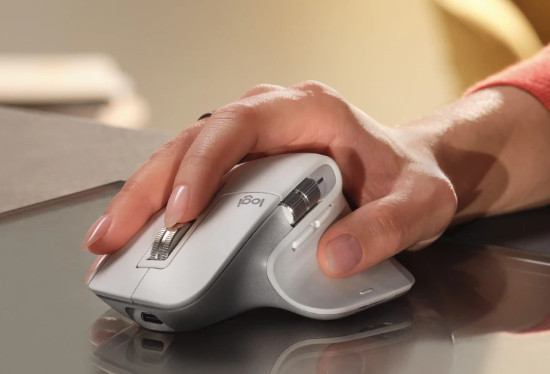
The MX Master 3S keeps the ergonomic design that made previous models so popular. The mouse is shaped to fit the natural curve of your hand, reducing wrist strain during long work sessions.
Key design highlights include:
• Premium matte finish
• Sculpted ergonomic shape
• Thumb rest for better control
• Solid build quality
The materials feel durable and high-end, making the mouse suitable for both office setups and professional workstations.
Comfort and Ergonomics
One of the biggest advantages of the MX Master 3S is its exceptional comfort.
The design supports the palm and thumb naturally, allowing users to work for hours without discomfort. This makes the mouse ideal for:
• Designers
• Developers
• Video editors
• Office professionals
If you spend most of your day using a computer, the ergonomic shape of this mouse can significantly improve your workflow comfort.
Performance and Precision
The MX Master 3S includes a high-precision optical sensor capable of tracking on almost any surface, including glass.
Performance features include:
• Up to 8000 DPI sensor
• Smooth and accurate tracking
• Works on glass surfaces
• Perfect for large high-resolution displays
This level of precision makes the mouse excellent for creative work, multitasking, and high-resolution monitors.
Silent Click Technology
One of the biggest improvements in this model is the quiet click technology.
Compared to previous versions, the MX Master 3S reduces click noise by around 90%, making it perfect for:
• Quiet office environments
• remote work setups
• late-night work sessions
Despite being quieter, the clicks still feel responsive and tactile.
Smart Productivity Features
The MX Master 3S includes several smart features designed to boost productivity.
These include:
Customizable Buttons
Users can assign different functions to buttons for specific applications such as Photoshop, Premiere Pro, or Excel.
MagSpeed Scroll Wheel
The electromagnetic scroll wheel allows extremely fast and precise scrolling through long documents or webpages.
App-Specific Profiles
The mouse can automatically adjust controls depending on the application you’re using.
These features make the MX Master 3S one of the most powerful productivity mice available today.
Multi-Device Connectivity
The mouse supports multi-device connectivity, allowing users to switch between multiple computers easily.
Connectivity options include:
• Bluetooth connection
• USB receiver support
• Easy switching between three devices
This feature is especially useful for users who work with multiple laptops or desktops.
Battery Life
Battery life is another strong advantage of the MX Master 3S.
A full charge can last up to 70 days, depending on usage.
Additional battery benefits include:
• USB-C charging
• Fast charging support
• Long standby time
Even a short charge can provide hours of use, which is perfect for busy professionals.
Pros and Cons
Pros
Excellent ergonomic design
Very quiet clicks
High precision tracking
Outstanding battery life
Powerful productivity features
Cons
Premium price
Slightly heavy for some users
Best suited for right-handed users only
Who Should Buy the MX Master 3S?
The Logitech MX Master 3S is ideal for:
• Programmers
• Designers
• Content creators
• Office professionals
• Anyone who spends many hours on a computer
If productivity and comfort are your priorities, this mouse is one of the best investments you can make for your workspace.
Final Verdict
The Logitech MX Master 3S continues the legacy of one of the most popular productivity mice ever made.
With its silent clicks, precise sensor, premium design, and powerful customization features, it offers one of the best experiences for professionals and power users.
While the price is higher than standard mice, the comfort and productivity benefits easily justify the investment.
For users looking for the best productivity mouse in 2026, the MX Master 3S remains one of the top choices.