

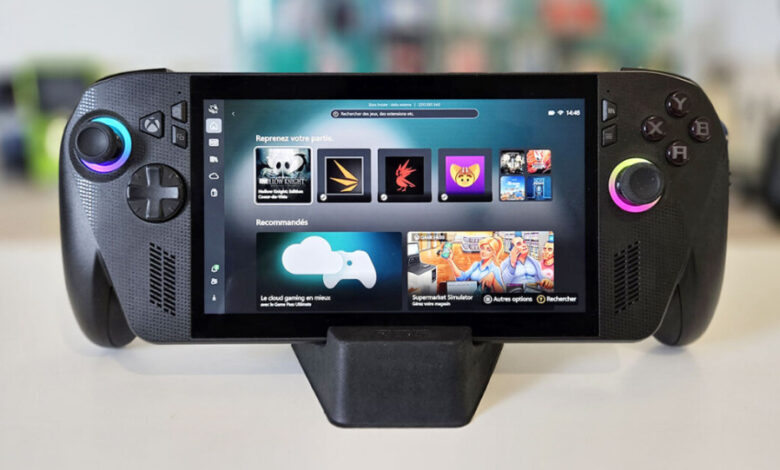
The ROG Xbox Ally X is a high-end handheld built by ASUS in collaboration with Xbox and ROG. It pairs a full Windows 11 environment with a console-style interface and adds ergonomic grips that make it feel more like a “real controller with a screen” than a mini laptop in your hands.
This ROG Xbox Ally X review breaks down the things that actually matter when you’re spending $999: specs that impact real gameplay, performance and thermals, comfort over long sessions, battery life, and whether the value makes sense in 2026.
Specs at a glance (what matters, not marketing)
Exact configurations can vary by region, but here’s what to focus on when judging any premium Windows handheld:
-
Processor/GPU class: Determines frame rates and how well it handles newer AAA games
-
RAM capacity & speed: Impacts stability, loading, and performance in demanding titles
-
Storage: A 1TB drive is the “sweet spot” for modern game sizes
-
Display: Refresh rate and brightness matter more than raw resolution for handheld play
-
Battery capacity: A bigger battery helps, but settings and game type matter more than the number
-
Cooling design: A handheld can be fast or quiet or cool—rarely all three at once
Bottom line: The Ally X positions itself as a “no-compromises” handheld, but the experience is only as good as the balance between performance, heat, fan noise, and battery.
Design and comfort: Where this handheld really wins
A lot of handheld PCs feel powerful but awkward—sharp edges, cramped grips, or triggers that don’t feel console-grade. The Ally X’s ergonomic grips are a major advantage, especially if you play for 60–90 minutes at a time.
What stands out in day-to-day use:
-
More natural grip angle: Less wrist tension compared to flatter handheld designs
-
Better “controller feel”: Helps with shooters, racing, and long sessions
-
Weight distribution matters: Even a heavy handheld can feel comfortable if the balance is right
If you’ve ever tried a handheld PC and thought “this feels like a gadget,” the Ally X is clearly trying to feel like a console controller first.
Console-style interface on Windows 11: Best of both worlds (with a catch)
This is the core idea: console simplicity without losing Windows flexibility.
What it does well
-
Controller-first navigation: You can boot in and start gaming without hunting through desktop menus
-
Quick access to library + settings: Feels closer to a console dashboard
-
Still a full PC: Mods, launchers, productivity apps, and broader compatibility remain available
The catch
Even with a console-style layer, you’re still on Windows. That means:
-
Occasional pop-ups
-
Updates at inconvenient times
-
Some games/launchers that don’t behave nicely on a small touchscreen
-
More settings to manage than a true console
If you enjoy tweaking settings for better FPS and battery, it’s great. If you want “press power → play,” you’ll still have moments of PC reality.
(Internal tip link: Best Settings for Windows Handheld Gaming)
Performance: What you can realistically expect
A $999 handheld needs to do two things:
-
Run modern games smoothly, and
-
Stay stable under load without becoming unbearable to hold.
In practical terms, most high-end handheld PCs shine when you play:
-
1080p with smart upscaling, or
-
900p/720p tuned for battery and heat, depending on the game
Where the Ally X should feel strongest
-
Competitive titles (FPS, sports, racing) tuned for high refresh and responsiveness
-
AA/indie games that run extremely well at high settings
-
AAA titles with balanced settings + upscaling (where the handheld’s GPU can breathe)
Where you’ll still compromise
-
Newest AAA releases at max settings
-
Ray tracing-heavy games (often not worth it on handheld power budgets)
-
Ultra-high FPS targets in demanding titles unless you lower settings
Key takeaway: This isn’t “desktop replacement” performance. It’s portable PC gaming done right, with the flexibility to tune for your priorities: quality, FPS, noise, or battery.
Thermals and fan noise: The unglamorous reality of handheld power
High performance in a small body means heat. The big questions are:
-
Does it get uncomfortably warm where your palms rest?
-
Does the fan become distracting in quiet rooms?
-
Does performance remain consistent, or does it throttle after 20–30 minutes?
What you should test (and mention in your full review):
-
30-minute sustained gaming (same scene/area) to check stability
-
Hand comfort after 45–60 minutes
-
Noise in “balanced” mode vs “turbo” mode
-
Charging while playing, which can increase heat
If the Ally X maintains steady performance while keeping the grip area comfortable, that’s a big win—because that’s what separates “powerful” from “pleasant.”
Battery life: The real answer is “it depends”
Even with a larger battery, battery life is dictated mostly by game type + performance mode + brightness.
Typical handheld reality:
-
Indie / retro / cloud gaming: longest battery life
-
Competitive titles at tuned settings: solid middle ground
-
AAA games at high wattage: shortest battery life (often the main tradeoff)
If you want to make the Ally X feel “worth it,” you’ll likely:
-
Use balanced profiles on battery
-
Cap frame rate when it doesn’t hurt gameplay
-
Use upscaling instead of brute-force resolution
-
Save turbo mode for plugged-in play
(Internal tip link: Best Settings for Windows Handheld Gaming)
The $999 question: Is it worth it in 2026?
It depends on what you’re comparing it to.
It’s worth $999 if…
-
You want a premium Windows handheld gaming PC and will actually use the extra power
-
You value comfort and ergonomics enough to pay for it
-
You want a device that can function as both a gaming handheld and a small portable PC
-
You like the idea of an Xbox-style experience without losing PC flexibility
It’s not worth $999 if…
-
You mostly play lightweight games (a mid-range handheld will feel almost the same)
-
You hate Windows maintenance and want a pure console feel
-
You already own a similar handheld and don’t need the upgrade
-
Your priority is maximum value per dollar
(Internal comparison link: ROG Ally vs Ally X Comparison)
(Internal roundup link: Best Gaming Handhelds 2026)
Verdict
The Ally X is aimed at people who want the closest thing to “console comfort” on a Windows handheld, without giving up PC freedom. If you’ll take advantage of the premium performance, the ergonomic grips, and the console-style interface—then the $999 price can make sense. If not, you may be paying for headroom you won’t use.
FAQ (short answers)
1) Is the ROG Xbox Ally X a console or a PC?
It’s a Windows 11 handheld PC with a console-style interface designed for controller-first use.
2) Is the ROG Xbox Ally X worth $999 in 2026?
Worth it if you want premium handheld performance and comfort; less worth it if you mainly play lightweight games.
3) Does it feel comfortable for long sessions?
Its ergonomic grips are a major plus—comfort is one of its biggest reasons to choose it over other handheld PCs.
4) How do you get better battery life on a Windows handheld?
Lower brightness, cap FPS, use balanced modes, and prefer upscaling instead of high native resolution.
5) Who should buy it?
Power users who want portable PC gaming, Game Pass/library flexibility, and an Xbox-like experience in one device.