
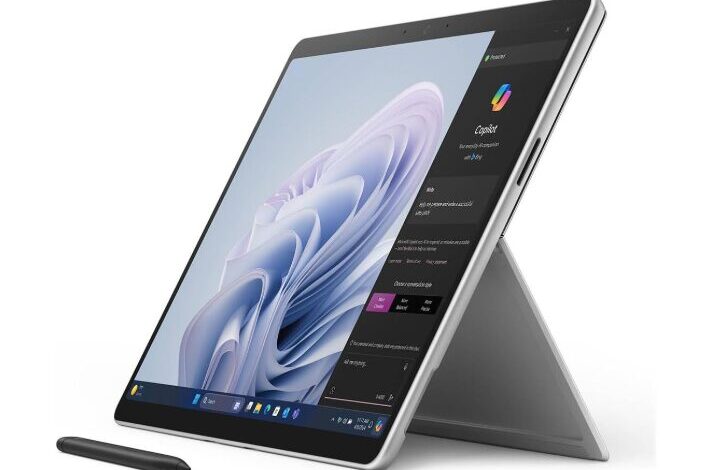
The Microsoft Surface Pro 10 continues Microsoft’s tradition of blending the portability of a tablet with the power and productivity of a laptop.
Designed primarily for professionals, students, and business users, the Surface Pro 10 runs a full version of Windows, making it capable of running desktop software like Microsoft Office, Photoshop, and development tools.
In this review, we’ll explore the design, display, performance, battery life, and productivity features to determine whether the Surface Pro 10 is one of the best tablets for work in 2026.
Design and Build Quality
The Surface Pro 10 maintains the sleek and minimalist design that the Surface lineup is known for.
Key design features:
• Premium magnesium alloy body
• Ultra-thin and lightweight design
• Integrated adjustable kickstand
• Detachable keyboard support
The built-in kickstand allows users to easily switch between laptop, tablet, and studio modes, making it extremely versatile.
Despite being lightweight, the device feels solid and durable, suitable for both office and travel use.
Display Quality
The Surface Pro 10 features a 13-inch PixelSense Flow display.
Display highlights:
• 2880 × 1920 resolution
• 120Hz refresh rate
• excellent brightness and color accuracy
• touchscreen with stylus support
This display is perfect for:
-
productivity tasks
-
drawing with the Surface Pen
-
watching videos
-
reading documents
The 120Hz refresh rate makes scrolling and writing smoother than traditional 60Hz screens.
Performance and Hardware
The Surface Pro 10 is powered by the latest Intel Core Ultra processors, designed for both performance and efficiency.
Performance advantages:
• powerful multi-tasking capabilities
• excellent productivity performance
• support for professional applications
• AI acceleration features
The device easily handles tasks such as:
-
running multiple productivity apps
-
editing photos
-
coding and development
-
video conferencing
This makes the Surface Pro 10 a strong laptop replacement for many users.
Keyboard and Stylus Experience
Microsoft designed the Surface Pro to work seamlessly with its accessories.
Surface Pro Keyboard
• full laptop-style typing experience
• large precision trackpad
• detachable design
Surface Slim Pen
• pressure-sensitive stylus
• excellent writing and drawing precision
• magnetic charging and storage
These accessories transform the tablet into a complete productivity workstation.
Battery Life
Battery life on the Surface Pro 10 is impressive for a full Windows device.
Expected performance:
• up to 12–15 hours of typical usage
• efficient power management
• fast charging support
This allows the tablet to last through a full workday without needing to recharge.
Ports and Connectivity
The Surface Pro 10 includes several useful connectivity options.
Ports include:
• USB-C with Thunderbolt support
• Surface Connect charging port
• Wi-Fi 6E connectivity
• optional 5G support on some models
These features make the device flexible for both office setups and mobile productivity.
Pros and Cons
Pros
Powerful Intel processors
Runs full Windows desktop apps
Excellent display with 120Hz refresh rate
Versatile design with kickstand
Great keyboard and stylus support
Cons
Keyboard and stylus sold separately
More expensive than many tablets
Shorter battery life than some ARM tablets
Who Should Buy the Surface Pro 10?
The Surface Pro 10 is ideal for:
• professionals who need Windows apps
• students and researchers
• remote workers
• users who want a tablet that replaces a laptop
It is particularly strong for users who depend on desktop productivity software.
Final Verdict
The Microsoft Surface Pro 10 is one of the most capable hybrid devices available today.
With its powerful hardware, high-quality display, and versatile design, it bridges the gap between laptops and tablets better than most competitors.
For professionals who want a portable device that can replace a laptop, the Surface Pro 10 is an excellent choice.
It will also appear in our upcoming guide to the Best Tablets of 2026, where we compare the top tablets on the market.
The Surface Pro 10 is also featured in our complete guide to the Best Tablets of 2026.
FAQ
Is the Surface Pro 10 a laptop or a tablet?
It is a hybrid device that functions as both a tablet and a laptop when paired with the keyboard.
Can it run full Windows applications?
Yes. It runs the full Windows operating system and supports desktop software.
Is the keyboard included?
No, the keyboard is sold separately.
Is the Surface Pro 10 good for work?
Yes. It is one of the best tablets available for productivity and professional use.